Summer is here! At least in the Northern Hemisphere. I moved to Sapporo, Hokkaido (Japan’s northern island) earlier this year, and the Summer weather is perfect (as a Canadian, it reminds me of home). I hope you’re all doing well. Here’s the latest update on my CCIE journey.
I skipped last month’s update largely due to procrastination, and by the time mid-June came around I figured I might as well bundle the May and June updates together. My total flashcard count is up to 6,515, and to be honest it probably won’t grow all that much from here.
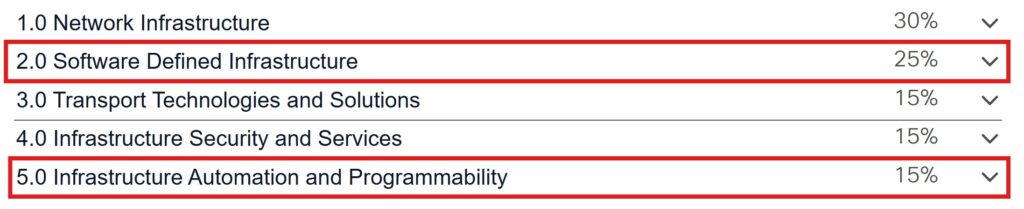
I’ve finished my first pass through all of the “traditional” CCIE topics – everything except automation, SD-WAN, and SD-Access. Those remaining topics account for 40% of the exam by weight, so there is still plenty left to study, but in terms of the number of topics I’ve covered the bulk of them. I already have my SD-WAN specialist certification (ENSDWI exam), so I just have to review and get up to date on any changes since I last studied it, leaving SD-Access and automation as the remaining topics.
Since the beginning of June, I’ve taken a break from “studying”, focusing entirely on labbing what I’ve learned so far to build up my speed and confidence. Specifically, I’m working through an excellent lab book that the author, Judson Bishop, shared on Reddit: Advanced Enterprise Infrastructure Labs (AEIL) I can’t overstate how helpful these labs have been. As far as I can tell, there are labs for all of the topics on the CCIE EI blueprint. It’s a fantastic resource, and it’s FREE!
One of my favorite points about these labs is how each of them integrates multiple exam topics. An OSPF lab focuses primarily on OSPF, of course, but also might integrate other topics like MPLS L3VPN, IPsec, configuring other routing protocols with mutual redistribution, some services, etc. There are some mistakes in the lab book, provided solutions, and lab files, but they don’t detract from the overall quality. Plus, a CCIE candidate should be able to identify and fix those issues anyway.
As I said in my previous update, in this update I want to share some of my thoughts about flashcards and why I use them so extensively in my studies. But first, I want to emphasize that they are a tool. They aren’t my entire study strategy, but rather one tool I use to help ensure that the various concepts I study remain in my long-term memory. And to take something from working memory and place it into long-term memory, the key is active recall.
Taking notes is helpful, especially the process of thinking about the concepts you’ve studied, formulating them in your own words, and building a logical structure in which to organize them. If you study a topic using several resources (videos, books, documentation/RFCs, labs) and combine them all into a well-structured set of notes, you’ve made a big step toward understanding the topic.
But that doesn’t guarantee that what you’ve learned will remain in your long-term memory – even the best set of notes is still outside of your brain. To ensure the topics remain in your memory, you need to periodically review them, and that doesn’t mean just reading – it means active recall. Flashcards, especially using spaced repetition software (SRS) like Anki, are a great tool for that.
For example, when studying and labbing the BGP local-as command, I made a series of flashcards like this:
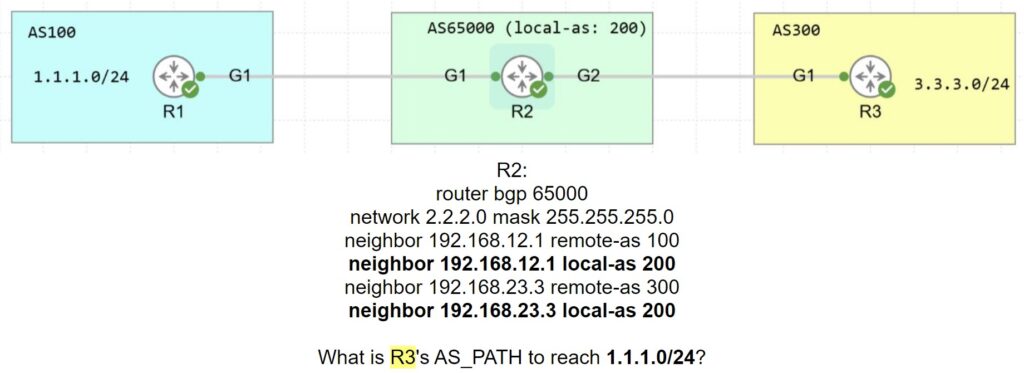
For those who are curious, here is the answer on the back of the flashcard:

This flashcard comes up in my reviews occasionally, ensuring I understand how the local-as command affects the AS_PATH.
Here’s another example with the no-prepend and replace-as options:
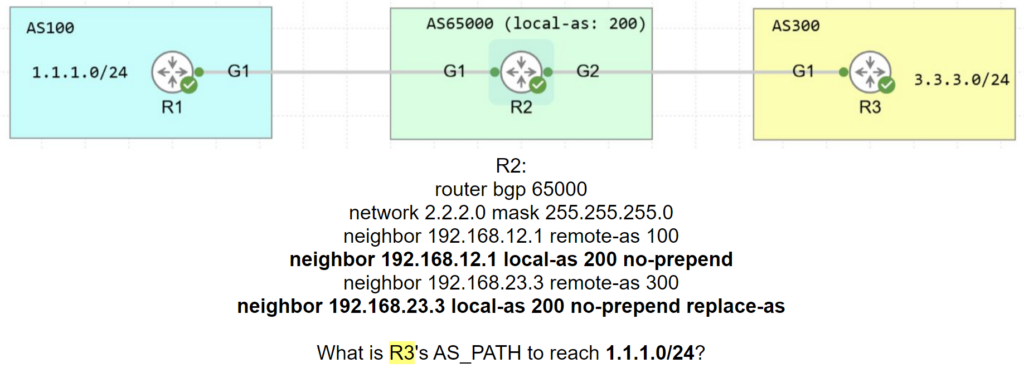
And here’s the answer:

I labbed and made similar flashcards for every combination of local-as, no-prepend, and replace-as to understand how they affect the AS_PATH as R2 receives the 1.1.1.0/24 route from R1 and advertises it to R3. It’s a small upfront investment of time, but now I’ll never forget it!
Some of my flashcards are simpler:

The answer is all transit/non-stub links. I also make variations like:
- The OSPF […] feature sets the router’s metric to 65535 for all transit/non-stub links.
- The OSPF stub router feature sets the router’s metric to […] for all transit/non-stub links.
To get familiar with commands, labbing daily is most important, but I also make flashcards to remember specific commands. Here’s one example:

The answer is ip ospf dead-interval minimal hello-multiplier multiplier.
I’d love to hear your thoughts on flashcards as a study tool. I know they aren’t for everyone, but they have been so helpful for me that I always recommend at least giving them a try.
And now that I’ve extolled the virtues of flashcards, I’d like to make a concession: notes are also helpful. In the past, I haven’t made much use of note-taking. I made flashcards as I studied, did plenty of labs, and that was generally enough. But as I’ve been studying for the CCIE, I’ve thought that it would be helpful to have a “repository” of everything I’ve studied as an easy reference.
To that end, I’ve been experimenting with mdBook and GitHub Pages to keep my notes. Making these notes serves as a second pass through the topics I’ve studied, and I’m finding the process very helpful. Perhaps in the next update I’ll share what I have so far.
But let me be upfront: they are AI-assisted notes. My general process is to gather everything I want to include in the notes, have AI generate the Markdown files, and then go through them and edit/correct errors, add and remove sections, add CLI output from my labs, etc. The notes are specifically for my own purposes, so they aren’t up to the level that I’d “officially” release them like a course. But they might be helpful to others studying for the CCIE EI, so I’ll share them at some point.
That’s all for this update. See you next month!
Hi Jeremy!
Great to hear from you, I’ve never replied on here before but wanted to share my perspective on Anki. I’ve been studying for the CCNA over the last few months using your course, labs, and Anki notes. it’s been an absolute blast. I’m on day 52 now, so I’m hoping to start practice exams soon and then schedule the actual exam.
Anyway, in regard to Anki, I used it a lot in college and found it extremely helpful, before I knew about Anki I struggled a lot with active recall and Anki changed that for me.
Also, I’ve doing something a little unusual with Anki, I’ve been adding your CCNA labs as Anki notes, what do I mean by this?
Every time I do a new lab (after finishing the related lesson) I add a note for it i.e. “Day 52 Lab”, the other side of the card is simply me asking myself “Did you manage to do the lab on your own?” the idea is to be able to do all of the commands without having to follow the lab video.
With a lot of cisco commands, I’ll remember them in relation to the Anki card, but may freeze up with faced with the actual CLI, this helps avoid that issue for me, using the commands within the actual context.
I don’t do this for every lab, as some can also fall into pattern recognition territory, but it certainly helps with lab subjects that don’t come up again for a while.
Pattern recognition is my only real struggle with Anki, where I start just recognizing the actual card, and not the subject itself (Like recognizing a question and remembering the answer, not based on the actual words, but based on the structure of the phrase). with cards like this I usually either try to slow down, think about why the answer is correct, or change the phrasing to avoid my mind immediately recognizing the card. I’m curious to know if this is something you’ve delt with before.
Sorry for the long rant, just wanted to share my passion, can’t wait to read more about your CCIE journey, and thank you for all of the amazing resources you’ve shared with the world.